

Cart is empty

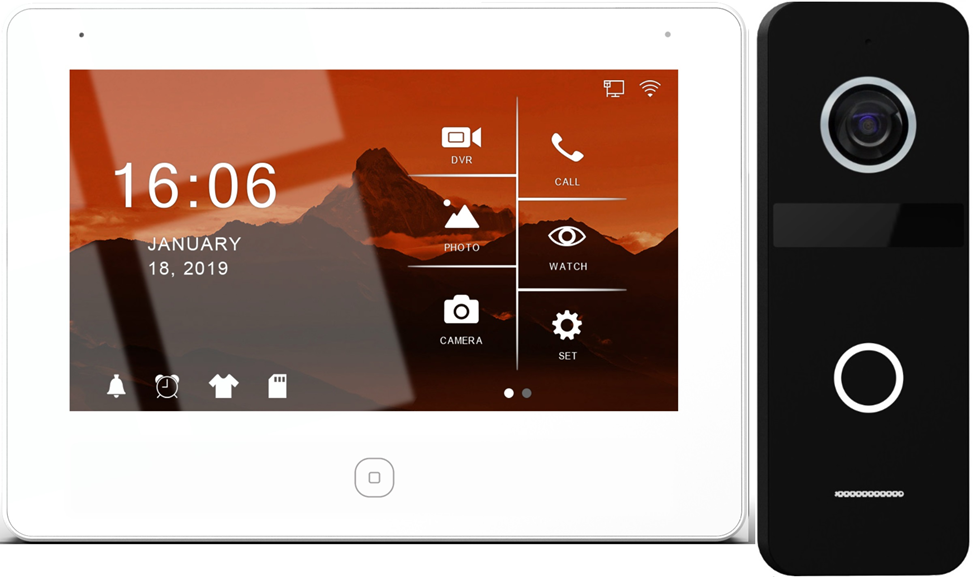
Wi-Fi Video Intercoms: The Wireless Convenience
In 2025, modern access control isn’t just about who can get in; it’s about how Home Automation Smart Intercoms and securely they do it. Whether you’re wiring a new apartment block, retrofitting a commercial building, or upgrading home security, the choice between Wi-Fi video intercoms and IP intercom kits is now front and centre for Australian installers and contractors.
The line between the two isn’t always clear and that’s where most design or install hiccups happen. This guide breaks down what every trade should know about network design, PoE switches, RFID, and wiring layouts plus a few insider tips on sourcing the right gear from AGM Electrical Supplies.
Let’s start with Wi-Fi systems the go-to for small to medium residential projects.
Wi-Fi intercoms use the building’s wireless network to transmit audio and video between the door station and the indoor monitor or smartphone app. The biggest selling point? Simplicity.
No need to run network cables through walls, no PoE switches to configure just connect, power up, and pair.
Best suited for:
- Small homes and apartments
- Retrofits and renovations
- Projects where conduit space or wall access is limited
Trade tip: Always check Wi-Fi signal strength near the door station. Weak signals lead to lag, dropouts, or missed alerts. A Wi-Fi extender or mesh access point can save a lot of post-install headaches.
IP Video Intercom Kits: The Pro Choice for Larger Jobs
Now, for the serious setups IP intercom systems. These use Ethernet cabling (Cat6 or Cat6A) and often PoE (Power over Ethernet), making them ideal for large-scale or commercial jobs where reliability is non-negotiable.
An IP intercom kit includes a door station, indoor monitor, and sometimes a network video recorder (NVR) for video archiving. Because everything runs on the local network, latency is low and stability is high a must-have for multi-dwelling or mixed-use projects.
Best suited for:
- Apartment complexes
- Office buildings
- Schools and aged care facilities
Why trades love IP kits:
- Seamless integration with access control and CCTV
- PoE power fewer cables, cleaner installs
- Expandable to multiple doors and monitors
- Compatible with building management systems
Network Design: Getting PoE Right
The heart of a reliable IP video intercom system lies in the PoE switch. Choose one that matches your load requirements.
For instance:
- 4-port or 8-port PoE switches are perfect for small systems.
- 24-port managed switches are essential for multi-entry or multi-level sites.
Always check the PoE budget an 802.3af switch supplies up to 15.4W per port, while 802.3at can handle 30W. Higher-end video intercoms or door stations with heaters, RFID, or large displays might need that extra power.
Trade tip: Run all intercom cabling in star topology rather than daisy-chaining. It simplifies fault finding and keeps latency low.
RFID, Door Stations & Smart Access Integration
Modern door stations are doing much more than letting someone in. The latest models integrate:
- RFID card or fob readers for secure, keyless entry
- QR code scanners for temporary guest access
- Relay outputs for door strikes, gates, or boom gates
- CCTV passthroughs for live video feed
Pairing an RFID-enabled door station with a central IP intercom monitor gives end users a smooth experience think one tap to unlock, one touch to view.
Keep It Simple and Label Everything
Every experienced contractor knows documentation can save a day on-site.
Whether it’s a Wi-Fi video intercom or a PoE IP system, always prepare a clear wiring diagram before first fix. Label every Cat6 run at both ends, especially if you’re working in multi-storey developments or with multiple risers.
If your setup includes door strikes, gate controllers, or external power supplies, map the voltage sources clearly. This ensures compliance with AS/NZS 3000 wiring regulations and avoids warranty issues down the line.
Pro tip: Use colour-coded patch leads for door stations, monitors, and network devices it helps during commissioning and maintenance.
Wi-Fi vs IP Intercom: Quick Comparison Table
Feature | Wi-Fi Video Intercom | IP Video Intercom |
Connectivity | Wireless | Ethernet (Cat6/Cat6A) |
Power | Plug-in or 12V DC | PoE (Power over Ethernet) |
Range | Depends on Wi-Fi strength | Stable across LAN |
Scalability | Limited | Highly expandable |
Ideal Use | Small homes, retrofits | Multi-unit, commercial |
Setup Complexity | Easy | Requires network design |
Cost | Lower upfront | Higher initial, long-term ROI |
Compliance & Standards to Know
For intercom and access systems in Australia, always check compliance with:
- AS/NZS 3080: Cabling design for structured wiring
- AS/NZS 3018: Electrical installations for domestic dwellings
- AS/NZS 2201: Intruder alarm and access control systems
Meeting these ensures your installation passes inspection and stays future-proof as smart access technology evolves.
BOM Examples: What to Include in a Standard Setup
Here’s a sample Bill of Materials (BOM) for a small apartment IP intercom project:
- 1 x PoE Door Station with RFID & Camera
- 1 x 7” IP Indoor Monitor
- 1 x 8-Port PoE Switch (802.3at)
- 1 x Cat6 Cable Roll (305m)
- 1 x Surface Mount Box & Weather Shroud
- 1 x 12V Fail-Secure Door Strike
For Wi-Fi systems, replace the PoE gear with a reliable 12V power supply, wall mounts, and a strong wireless router.
ROI: Why Surge-Proof Smart Access Makes Financial Sense
While IP intercoms cost more upfront, their ROI is stronger for builders and property owners.
- They reduce maintenance calls compared to Wi-Fi setups.
- Integrate easily with CCTV and automation systems.
- Enhance tenant and owner value with modern convenience.
For homeowners, a well-designed smart access system can boost property value and meet modern security expectations especially in new developments or retrofits where smart home adoption is growing rapidly across Australia.
Common Mistakes to Avoid
- Relying solely on Wi-Fi in thick-wall homes use a wired fallback.
- Forgetting to allocate PoE power budget in design.
- Skipping firmware updates on intercom monitors.
- Overlooking proper surge and lightning protection on outdoor door stations.
Taking time to plan these details upfront saves you costly revisits later.
Choose the Right System, Not Just the Cheapest
Electrical Supplies by AGM Electrical Supplies When it comes to smart intercoms, it’s not about Wi-Fi versus IP it’s about matching the system to the job.
Installers and contractors who understand the nuances of network design, PoE allocation, and compliance will deliver systems that perform flawlessly for years. And with the rise of integrated building automation, getting intercom and access right is more important than ever.
Where to Buy Trade-Ready Smart Intercoms
For compliant, tested, and trade-trusted intercom gear from Wi-Fi video kits to PoE IP systems, switches, and accessories visit AGM Electrical Supplies.
They stock premium Australian brands, competitive pricing tiers, and expert support making it easier for contractors to build smarter, safer, and more connected spaces.










Recent posts
SMS, Wechat and Whatsapp Contact Details:
For quotes, orders or to get the latest product and pricing news
PLEASE NOTE: We Do Not ANSWER Phone Calls (messages only) and We only respond during business hours.-
Mobile for SMS only

-
Text Message on Whatsapp
 scan Me
 -
Text Message on WeChat
 Wechat ID: agmelectrical
 scan Me

× ![]()